
Multiverse
What It Is
World creation is provided by Multiverse-Core. It can control mob spawning, environment type, enable custom terrain generators, and much more! Despite being able to do all this, do note that Multiverse-Core does not create worlds itself, it simply makes calls to the Bukkit-API to create the worlds.
https://mvplugins.org/core/
Useful Commands
/mvtp [player(s)] <destination> [--unsafe] - Teleport to any destination (including worlds, portals, anchors, exact coordinates, other players (or their beds),
/mv anchor set <name> - Anchors make it simple to tag a location so you can get back to it easily with /mvtp.
/mv create <name> <environment> [--seed <seed>] [--generator <generator[:id]>] [--world-type <worldtype>] [--adjust-spawn] [--no-structures] [--biome <biome>] [--generator-settings <json>] - A whole new world!
mv create myworld NORMAL -g Terra:OVERWORLD - Example: create a world named "myworld" with the NORMAL environment and use the Terra plugin as the generator with the OVERWORLD Terra resource pack.
Related Plugins
Multiverse Portals
Multiverse-Portals provides portals between worlds, similar to vanilla portals, except the destination can go ANYWHERE, as opposed to just the nether.
https://mvplugins.org/portals/fundamentals/basic-usage/
Making a Gateway
In order to create a gateway, you need two portals: one on each end of the travel path.
To create a portal, you need a wand. The 'wand' is a special wood axe that allows you to create the portal. You'll want to have your portal structure already built and ready to go.
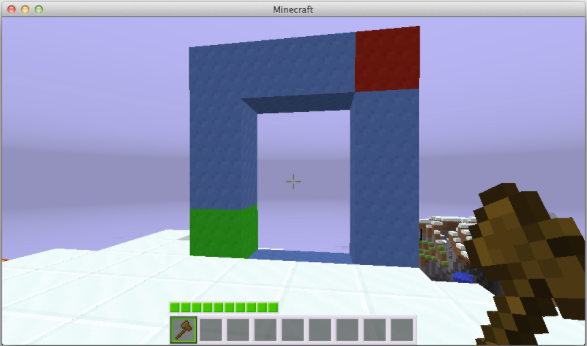
Identify the lower-left block of your portal (the green block in the image above) and the upper-right block of your portal (the red block).
//wand - Use this command to get the wand (ie, special wood axe). You'll use the wand to define the portal.
(left-click) - Left-click with the wand on the lower-left block. It'll look like you're attacking it, but it won't do damage. You should see "First position set to...".
`(right-click) - Right-click with the wand on the upper-right block. You should see "Second position set to...".
/mvp create <name> [destination] - Create the portal! If you don't have anywhere to link to, leave the destination off for now. If the other side of the portal exists, add it as the destination like "p:myportal".
/mvp modify <name> destination <destination> - Link your portal to a destination. This will typically be another portal, but doesn't have to be.
No comments to display
No comments to display